
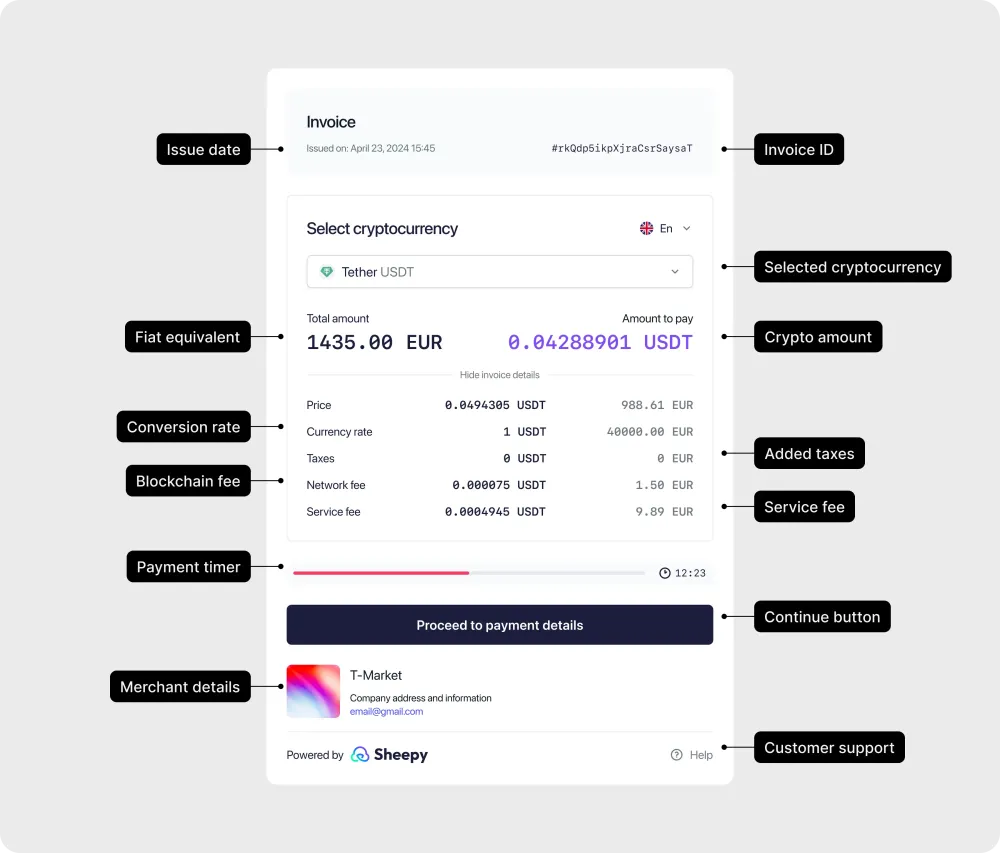
Important tips
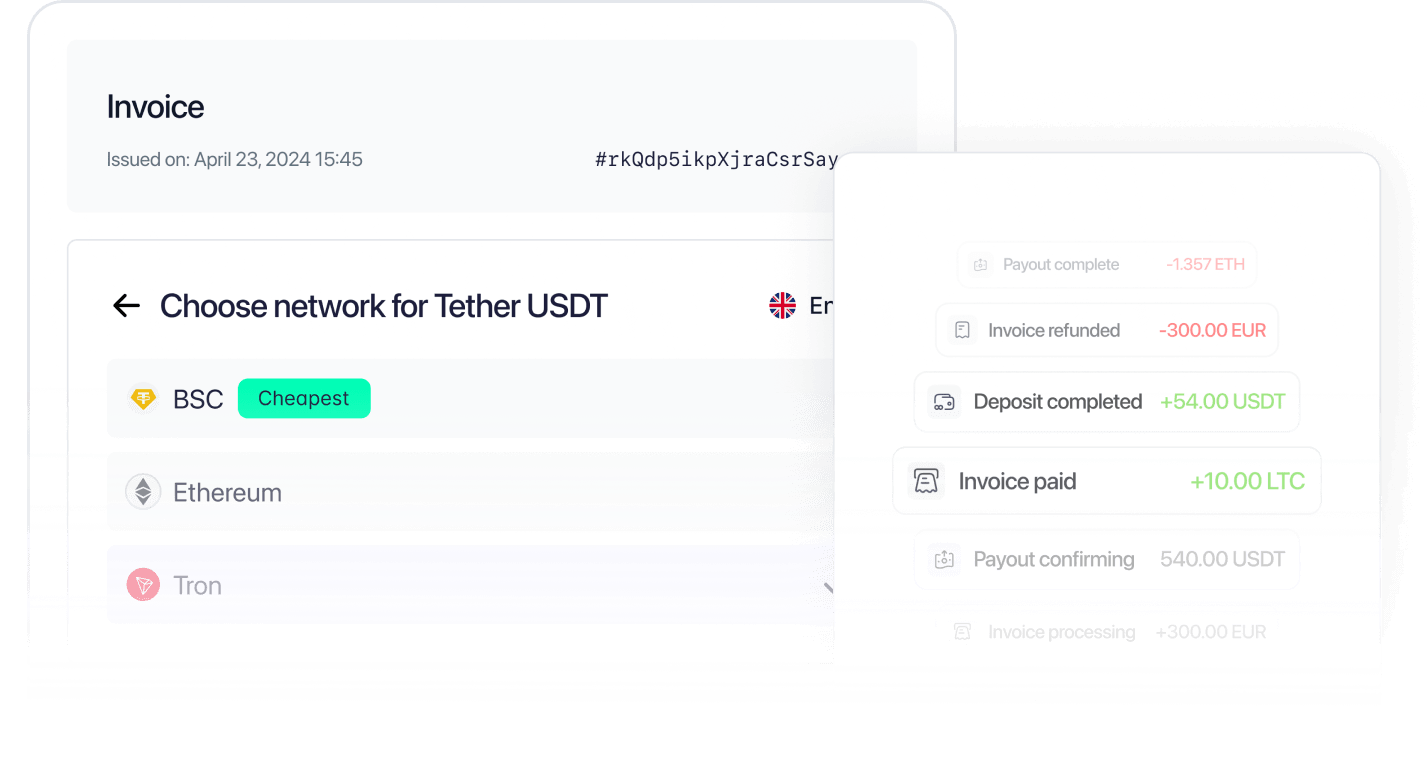
Choosing your network
Payment flow
Select the network that suits you best. Sheepy will show the wallet address and QR code for your transaction. Open your crypto wallet, copy the address or scan the QR code, and send the exact amount shown. Once the blockchain confirms the transaction, your payment is complete.
Payment details
After confirming your network, you’ll see the exact amount, wallet address, and QR code to complete your transfer. Always copy the details using the provided buttons and verify that you’re sending through the correct network. Check the amount and network carefully, include any required Destination Tag or Memo (for coins like XRP), and note that payments sent after the timer expires may not be processed. Sheepy keeps your crypto payments quick, accurate, and secure.
Need more help?
If you still have questions about using Sheepy, visit Support section for detailed explanations of payment tools and settings.
You can also check the FAQ page for quick answers to common questions about crypto payments and invoices.

'%3e%3cpath%20d='M5.33337%2017.3333C5.76671%2020.7093%207.84137%2023.708%2010.6667%2025.3333'%20stroke='%231C1D3B'%20stroke-width='2'%20stroke-linecap='round'%20stroke-linejoin='round'/%3e%3cpath%20d='M26.6667%2014.6667C26.3406%2012.3203%2025.2521%2010.1462%2023.5688%208.47934C21.8856%206.81246%2019.701%205.74524%2017.3516%205.44209C15.0021%205.13893%2012.6182%205.61666%2010.5669%206.80168C8.51571%207.98669%206.911%209.81326%206%2012'%20stroke='%231C1D3B'%20stroke-width='2'%20stroke-linecap='round'%20stroke-linejoin='round'/%3e%3cpath%20d='M5.33337%206.66666V12H10.6667'%20stroke='%231C1D3B'%20stroke-width='2'%20stroke-linecap='round'%20stroke-linejoin='round'/%3e%3cpath%20d='M16%2020H18.6667C19.0203%2020%2019.3594%2020.1405%2019.6095%2020.3905C19.8595%2020.6406%2020%2020.9797%2020%2021.3333V22.6667C20%2023.0203%2019.8595%2023.3594%2019.6095%2023.6095C19.3594%2023.8595%2019.0203%2024%2018.6667%2024H17.3333C16.9797%2024%2016.6406%2024.1405%2016.3905%2024.3905C16.1405%2024.6406%2016%2024.9797%2016%2025.3333V26.6667C16%2027.0203%2016.1405%2027.3594%2016.3905%2027.6095C16.6406%2027.8595%2016.9797%2028%2017.3333%2028H20'%20stroke='%231C1D3B'%20stroke-width='2'%20stroke-linecap='round'%20stroke-linejoin='round'/%3e%3cpath%20d='M24%2020V22.6667C24%2023.0203%2024.1405%2023.3594%2024.3905%2023.6095C24.6406%2023.8595%2024.9797%2024%2025.3333%2024H26.6667'%20stroke='%231C1D3B'%20stroke-width='2'%20stroke-linecap='round'%20stroke-linejoin='round'/%3e%3cpath%20d='M28%2020V28'%20stroke='%231C1D3B'%20stroke-width='2'%20stroke-linecap='round'%20stroke-linejoin='round'/%3e%3c/g%3e%3cdefs%3e%3cclipPath%20id='clip0_17690_160'%3e%3crect%20width='32'%20height='32'%20fill='white'/%3e%3c/clipPath%3e%3c/defs%3e%3c/svg%3e)
'%3e%3cpath%20d='M10.6667%208.00001C10.6667%207.29277%2010.9477%206.61449%2011.4478%206.11439C11.9479%205.61429%2012.6262%205.33334%2013.3334%205.33334H24.0001C24.7073%205.33334%2025.3856%205.61429%2025.8857%206.11439C26.3858%206.61449%2026.6667%207.29277%2026.6667%208.00001V18.6667C26.6667%2019.3739%2026.3858%2020.0522%2025.8857%2020.5523C25.3856%2021.0524%2024.7073%2021.3333%2024.0001%2021.3333H13.3334C12.6262%2021.3333%2011.9479%2021.0524%2011.4478%2020.5523C10.9477%2020.0522%2010.6667%2019.3739%2010.6667%2018.6667V8.00001Z'%20stroke='%231C1D3B'%20stroke-width='2'%20stroke-linecap='round'%20stroke-linejoin='round'/%3e%3cpath%20d='M5.33337%2013.3333C5.33337%2012.6261%205.61433%2011.9478%206.11442%2011.4477C6.61452%2010.9476%207.2928%2010.6667%208.00004%2010.6667H18.6667C19.374%2010.6667%2020.0522%2010.9476%2020.5523%2011.4477C21.0524%2011.9478%2021.3334%2012.6261%2021.3334%2013.3333V24C21.3334%2024.7072%2021.0524%2025.3855%2020.5523%2025.8856C20.0522%2026.3857%2019.374%2026.6667%2018.6667%2026.6667H8.00004C7.2928%2026.6667%206.61452%2026.3857%206.11442%2025.8856C5.61433%2025.3855%205.33337%2024.7072%205.33337%2024V13.3333Z'%20stroke='%231C1D3B'%20stroke-width='2'%20stroke-linecap='round'%20stroke-linejoin='round'/%3e%3c/g%3e%3cdefs%3e%3cclipPath%20id='clip0_17690_177'%3e%3crect%20width='32'%20height='32'%20fill='white'/%3e%3c/clipPath%3e%3c/defs%3e%3c/svg%3e)